
Cobalt
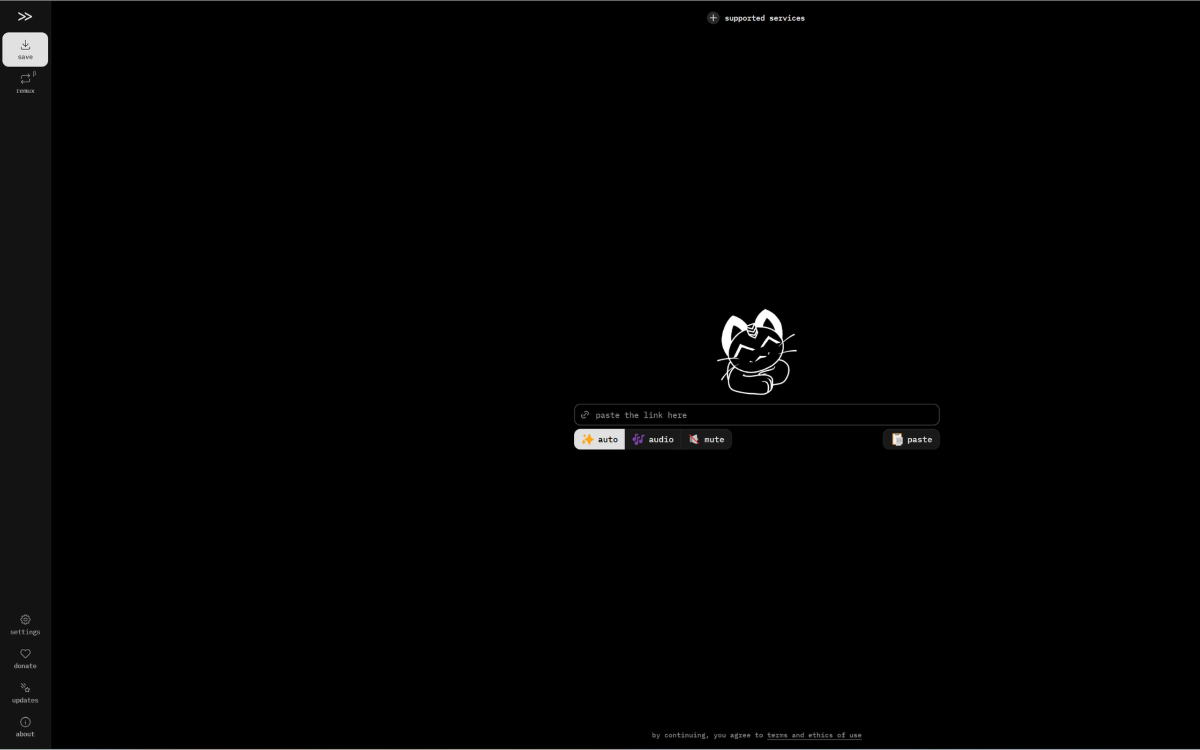

Téléchargeur
Cobalt est un téléchargeur multimédia pour les réseaux sociaux.
Collez le lien, récupérez le fichier, passez à autre chose. c'est aussi simple que ça, comme ça devrait être.
SOMMAIRE
1. Efficience
Cobalt est un outil qui facilite le téléchargement de contenu public. il n'y a aucune responsabilité. l'utilisateur final est responsable de ce qu'il télécharge, de la manière dont il utilise et distribue ce contenu. cobalt ne met jamais en cache aucun contenu ... (Extrait traduit du GitHub).
Cette application très simple d'utilisation fonctionne bien sur la plupart des réseaux sociaux. YouTube qui bloque cette application peut être téléchargé avec une installation locale.
2. Installation
La pré-configuration peut être opérée en téléchargeant le magasin tiers de IceStore, Hsinghhira propose une image compilée. Ci-après sa proposition de YAML pour information.
Puis sur la page de présentation de l'application, clique sur Installation personnalisée
YAML
Colbalt par IceStore
name: cobalt

services:
  cobalt:
    image: ghcr.io/hsinghhira/cobalt:latest
    container_name: cobalt
    restart: unless-stopped
    stop_grace_period: 40s
    privileged: true
    environment:
      - TZ=$TZ
      - PUBLIC_URL=http://localhost:6144
    ports:
      - target: 8080
        published: "6144"
        protocol: tcp
    volumes:
      - type: bind
        source: /DATA/AppData/$AppID/data
        target: /data
        bind:
          create_host_path: true
    healthcheck:
      test: ["CMD", "curl", "-fsS", "-o", "/dev/null", "http://127.0.0.1:8080/api/"]
      interval: 30s
      timeout: 10s
      retries: 5
      start_period: 60s
    deploy:
      resources:
        limits:
          cpus: "2.00"
          memory: 1024M
        reservations:
          cpus: "0.00"
          memory: 128M
    labels:
      icon: https://cdn.jsdelivr.net/gh/HSinghHira/IceStore@main/Apps/cobalt/icon.png
    x-casaos:
      id: com.icestore.cobalt
      envs:
        - container: TZ
          description:
            en_US: >-
              Your time zone. It is filled in from your ZimaOS time zone.
              Leave it unless you need another.
        - container: PUBLIC_URL
          description:
            en_US: >-
              The address you type in your browser. Download links are made
              from it, so it must be right. It starts as localhost, which only
              works on this device. For other devices, change `localhost` to
              your ZimaOS IP. Keep the port at 6144.
      ports:
        - container: "8080"
          description:
            en_US: cobalt web app and API, published on host as 6144
      volumes:
        - container: /data
          description:
            en_US: >-
              Settings and keys. Put cookies.json or keys.json in the config
              folder inside it.

x-casaos:
  id: com.icestore.cobalt
  architectures:
    - amd64
    - arm64
  main: cobalt
  author: HSinghHira
  category: Media
  developer: imputnet
  icon: https://cdn.jsdelivr.net/gh/HSinghHira/IceStore@main/Apps/cobalt/icon.png
  screenshot_link:
    - https://cdn.jsdelivr.net/gh/HSinghHira/IceStore@main/Apps/cobalt/screenshot-1.png
  title:
    en_US: cobalt
  tagline:
    en_US: Save videos, audio and pictures from the web. No ads, no trackers.
  description:
    en_US: >-
      cobalt saves what you love from the web. Paste a link from YouTube,
      TikTok, Instagram, Reddit, SoundCloud, Bluesky and many more sites, and
      get the file. No ads, no trackers, no paywalls. This is the official
      cobalt API and the official cobalt web app in a single container, with
      one port and one data folder.


      **Features**


      - Saves video, audio and pictures from dozens of sites


      - Pick video, audio only or muted video, plus quality and format in
        the settings


      - Nothing is stored: files stream straight from the site to you


      - Remux and convert files on your own device in the browser


      - The web app always matches the API version; both come from the same
        upstream release


      - Optional cookies for content that needs a sign-in, API keys and
        Cloudflare Turnstile bot protection for public instances


      **How to use?**


      1. Open cobalt from the Zima OS dashboard.


      2. Paste a link into the box.


      3. Pick auto, audio or mute, then save the file.
  tips:
    before_install:
      en_US: >-
        1. Open the app configuration before you install.


        2. Find PUBLIC_URL. It starts as http://localhost:6144.


        3. To use cobalt on other devices, change localhost to your ZimaOS
           IP address, like http://192.168.1.20:6144. Downloads only work
           from the address you put here.


        4. More settings, like turning sites off or bot protection, are
           listed on the cobalt page at https://icestore.hsinghhira.me/app/cobalt/
           (Variables tab). You can add them now or later in the app settings.


        5. Start the installation.


        6. Wait about a minute.


        7. Open cobalt from the Zima OS dashboard and paste a link.


        8. Some sites need you to be signed in. For those, put a cookies.json
           file in the config folder inside the app's data folder, then
           restart the app.
  index: /
  port_map: "6144"
  scheme: http
  is_uncontrolled: false
  version: "11.7.1"
  update_at: "2026-10-25"
  release_notes:
    en_US: |-
      - Single-container cobalt with one port (6144) and one data folder
      - The web app is the official one, built from the same commit as the API
      - Web app on /, API on /api, one address and port; the web app finds the API by itself
      - Drop cookies.json or keys.json in /data/config to use them
      - ghcr.io/imputnet/cobalt 11.7.1
  repo: "https://github.com/imputnet/cobalt"
  support: "https://github.com/imputnet/cobalt/issues"
  docs: "https://github.com/imputnet/cobalt/blob/main/docs/run-an-instance.md"
2.1. Image
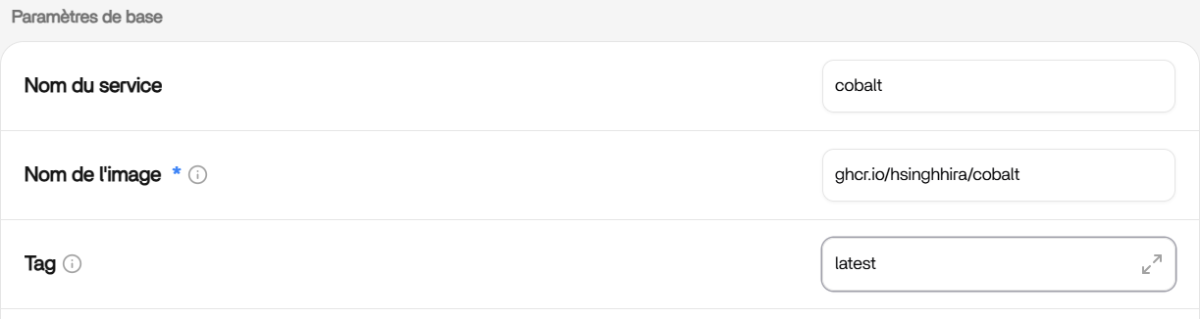
Sur l'onglet Formulaire, Paramètres de base, Tag modifie en "latest" (comme sur le YAML proposé).
2.2. Environnement
Sur l'onglet Formulaire, Environnement, Variables, Indique face à la fenêtre TZ
TZ
TZ=Europe/ParisPuis face Indique face à la fenêtre PUBLIC_URL, l'IP locale de ton serveur suivi du port 6144. Ci après, un exemple pour un serveur sur l'IP locale 192.168.1.9
Exemple pour IP locale
PUBLIC_URL=http://192.168.1.9:6144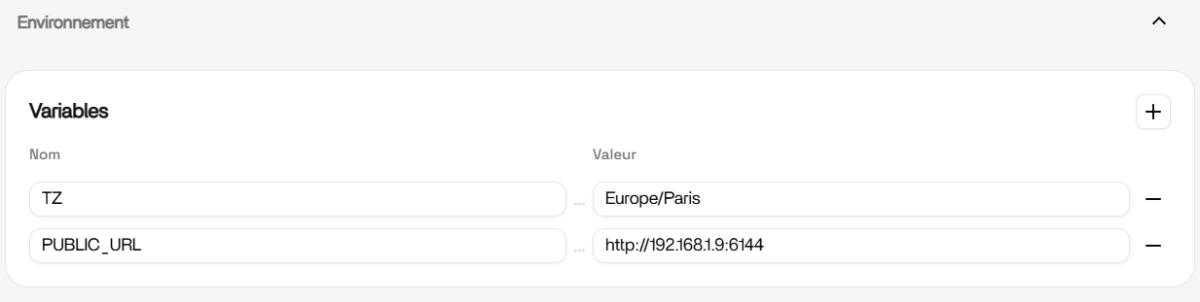
2.3. Installer
Valide avec le bouton Installer et patiente le temps du chargement de l'image.
Puis ferme la fenêtre, si tu as installer ZFW pour revenir sur l'interface de ZimaOS.
2.3. Autoriser ZFW
Si tu as installé le pare-feu, ZFW t'informe d'ouvrir le port de l'application Cobalt. Autorise ce port pour un accès sur l'interface du réseau local.
Clique à présent sur la nouvelle tuile créée.
3. CONFIGURATION
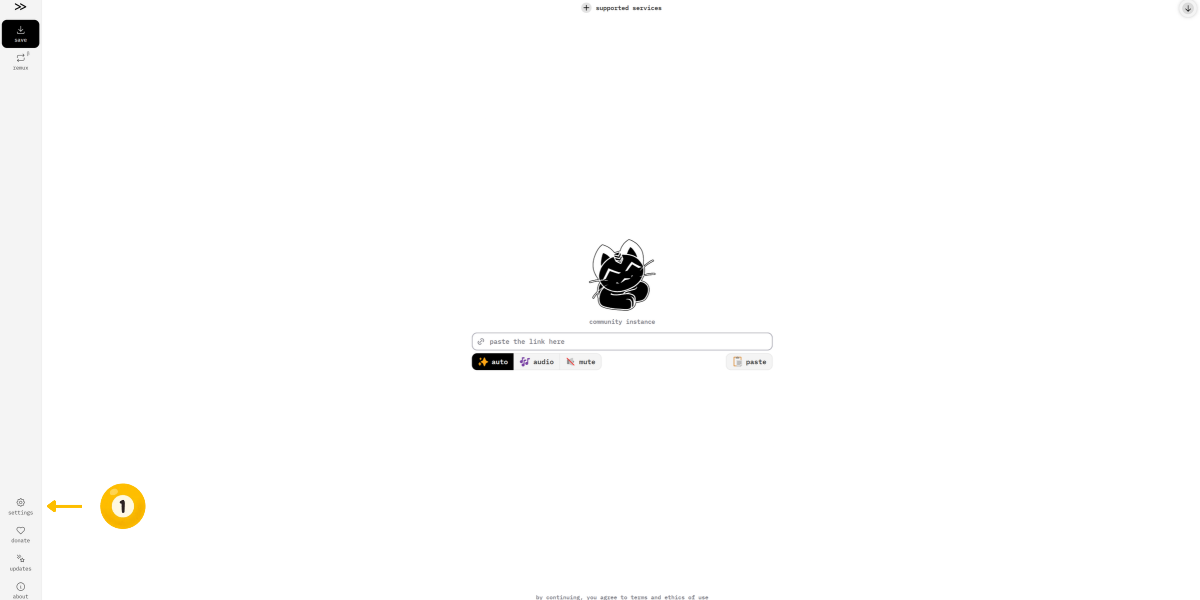
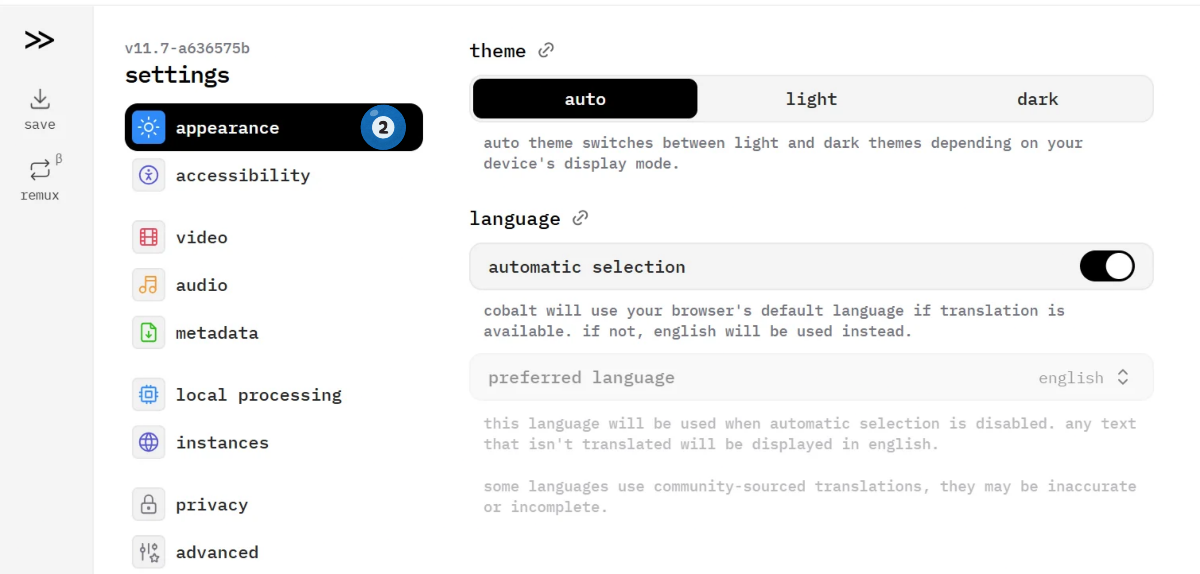
Sur la page d'atterrissage, très épurée, ouvre l'icône (1) settings
3.1. Apparence
Sur l'onglet (2) Appearance, tu peux déterminer le mode sombre ou clair. Concenant la langue seul l'anglais est proposé.
3.2. Local processing
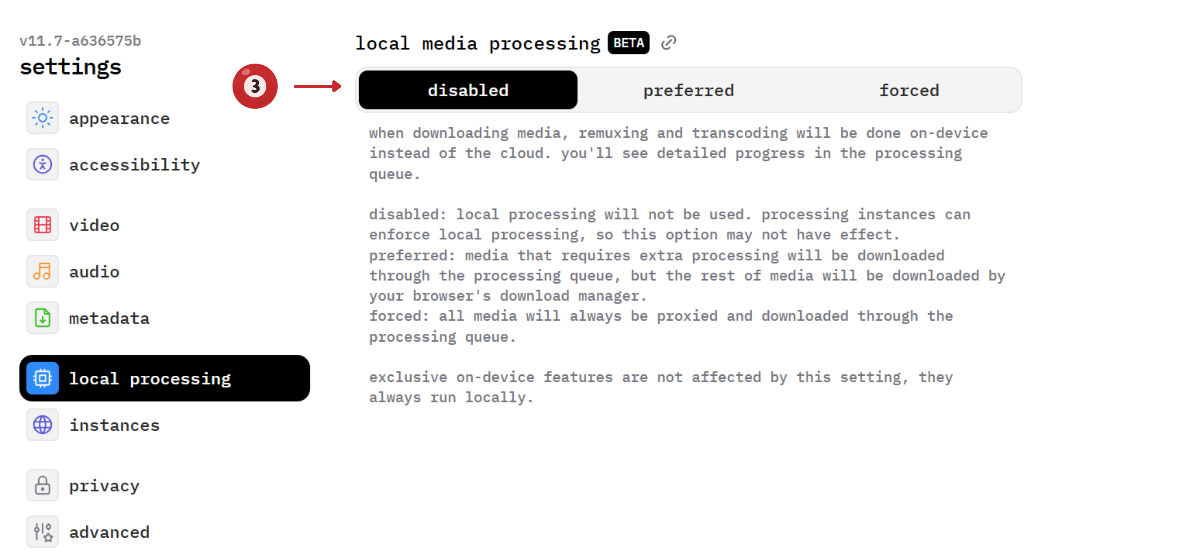
(3) Pour pouvoir télécharger des vidéos sur YouTube, il te faut désactiver cette fonctionnalité.
4. UTILISATION
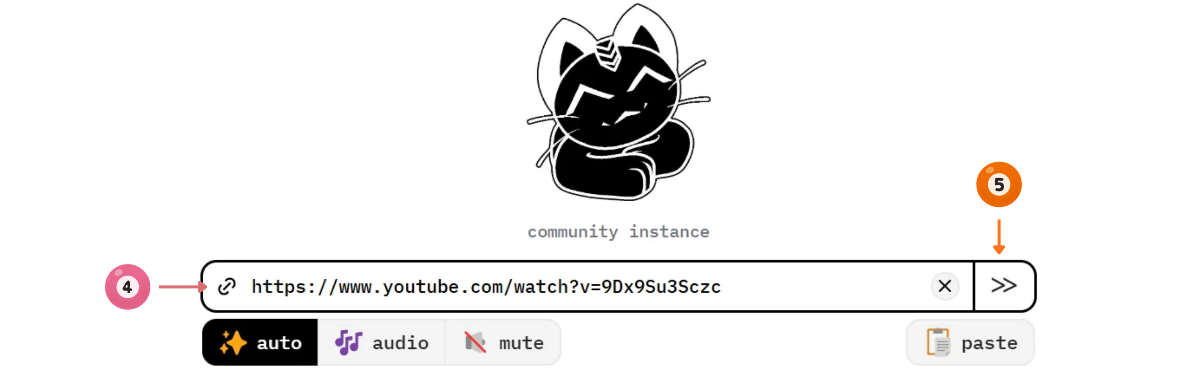
L'interface se veut des plus simple et épurée. Juste une fenêtre, pour (4) déposer le lien d'une plate-forme publique.
Fais un premier test avec un (4) copier-coller d'un lien YouTube (contrôle du blocage ?). Et, (5) clique au bout de la fenêtre sur l'icône >>
Pour les sites nécessitant d'une authentification, tu dois créer un fichier `cookies.json' voir la doc de Cobalt.